
-
InstaPay WebPay
-
WebPay Integration
-
Shopping Cart Plugins
-
- Articles coming soon
-
Testing
Overview
To streamline the payment process and enhance user convenience, we provide capability to create payment request links using API. These links can be embedded in “Pay Now” buttons on websites or email messages, included in invoices (e.g. via QR codes), and shared directly through messages. When a user interacts with any of these links, the InstaPay WebPay payment gateway will open in a browser, providing a seamless and secure payment experience.
The following endpoints are provided in this API bundle:
- Create Payment Request
- Merchants will be able to create a payment request token used to specify the details of the payment to be made by the customer receiving the payment request.
- Get Payment Requests
- This enables the Merchant to get one or more payment requests by criteria values. This is useful for reporting purposes.
- Get Payment Request by Token
- Detail of a specific Payment request can be requested using the token created above. This can be used to verify the status of a single request when necessary.
Use Cases
- “Pay Now” Buttons:
- Implementation: Embed the payment request link (created using the payment request API) into a “Pay Now” button on websites, within mobile applications, or in HTML based emails.
- User Experience: When the user clicks the button, they are redirected to the InstaPay WebPay payment gateway, where they can complete the transaction quickly and securely.
- Invoices with QR Codes:
- Implementation: Convert the payment request link (created using the payment request API) into a QR code using a QR code generation tool and include it on digital or printed invoices.
- User Experience: Users can scan the QR code with their mobile device, which will open the InstaPay WebPay payment gateway in their browser, facilitating immediate payment.
- Direct Messages:
- Implementation: Share the payment request link (created using the payment request API) directly through text-based email, SMS, or messaging apps.
- User Experience: Recipients can click the link, opening the InstaPay WebPay payment gateway in their browser, to complete their payment easily.
Integration
The following diagrams provide detail regarding the API endpoints and flows.
Create and use Payment Request

a. API request
Registering/creating a payment request is the first step towards the creation of a URL/link that a customer can use to make a payment.
Endpoint: Create payment request (multiple beneficiaries)
This endpoint provides huge flexibility, such as the capability to specify multiple beneficiaries (registered iAccount holders).
b. Response (tokenId)
The response contains a 10-digit token identifier (tokenId) that is used to create the payment link URL.
Once a tokenId has been received, a link can be constructed by concatenating the tokenId as a GET parameter on the base URL.
The following base URLs are applicable for the different environments:
- Sandbox: https://webpay-v2-sbox.omnea.co.za
- Live: https://webpay-v2.omnea.co.za
The payment link is created as follows:
{Base URL for Environment}/?tokenId=xxxxxxxxxx
E.g. for Sandbox: https://webpay-v2-sbox.omnea.co.za/?tokenId=1234567890
Once the payment link (URL) has been created, it can be communicated to the customer (payer) in various formats, and through different channels. This provides the flexibility to the Merchant to make use of its own preferred communication mechanisms and formats to request payment from its customers.
E.g. the Merchant can choose to integrate a QR code (that contains the payment) on an invoice, and send a text message via a mobile messenger app with a text link.
When the customer gets the payment link, and initiate the payment proses, the payment link URL navigates the customer’s internet browser application to the InstaPay WebPay V2 website. The URL must contain the token identifier (tokenId) as per previous steps.
The InstaPay WebPay process will automatically detect that the tokenId is included in the payment link URL.
a. Get payment request details
The tokenId is used to request the pre-registered payment request details from the back-end server.
b. Response
The returned payment request details are displayed to the customer for review.
The customer can continue with the process by selecting the preferred payment method. Only allowed payment methods are available for selection.
Once the customer selected a payment method, InstaPay Webpay opens up the selected payment method and the customer is prompted to provide details relevant to the selected payment process.
Each payment methods follows its own process specific to the data requirements and authorisation steps required for the involved method.
Upon successful completion of the payment process, the involved payment service provider sends a notification to the Core Transaction Bck-end server for processing.
The Core Transaction Back-end system validates the information received on the notification from the payment service provider, and allocate the funds to the involved iAccount(s). The funds are immediately available for further transactions.
Upon completion of the transaction on the payment service provider platform, the customer is redirected back to the InstaPay WebPay payment result page where the outcome (status) of the transaction is displayed.
If a notification URL was specified on the original payment request, InstaPay WebPay will send a notification message (webhook) to the specified URL.
The following document provides more details on the format and information provided in the payment notification.
When the merchant’s back-end server receives the payment notification message, it is crucial to validate the information. Several validation steps are recommended befor the payment result is processed. The relevant validation steps are also described in the no tification document as per the previous step:
Get Payment Request Details by TokenId

a. API request
This endpoint enables the Merchant to request details of a payment request created from the Merchant’s Back-end System.
Endpoint: Get payment request details by token
b. Response (tokenId)
The response contains a request ID that can be used to get details of the involved payment request.
The InstaPay API Hub requests the details of the payment request for the provided tokenId from the Core Transaction Back-end System. This ensures up to date information.
Get Payment Requests (filter criteria)
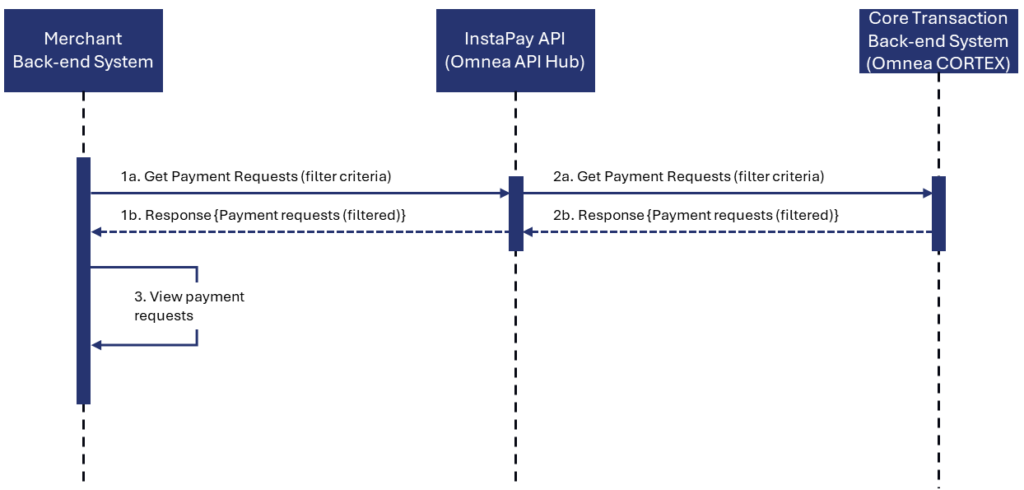
a. API request
This endpoint enables the Merchant to get details of one or more payment requests created from the Merchant’s Back-end System.
Endpoint: Get payment requests details.
b. Response (payment request detail)
The response contains details of all payment requests that comply with the filter criteria of the initia enquiry.
The InstaPay API Hub requests the details of the payment request for the provided tokenId from the Core Transaction Back-end System. This ensures up to date information.
The information provided back on the response can be displayed to the authorised users of the Merchant Back-end System.